Spreadsheet Application Backend
I’m sure you already know what a spreadsheet is. Tools like Google Sheets and Microsoft Excel are widely used for organizing and analyzing data in a tabular form. A fundamental feature of spreadsheet applications is the ability to write expressions in cells. This project is the backend that parses and evaluates those expressions. It supports:
- Order of operations with arithmetic operators (e.g.,
=3 + 5 * 2) - Expressions with cell references (e.g.,
=4 * A2) - Aggregate operators with variadic arguments (e.g.,
=SUM(A1:D5, C2, 10)) - Cascading cell updates (e.g., when
A2updates, the expression=A2 * 2should update)
This spreadsheet app was a solo project as part of an Object-Oriented Analysis and Design course at WPI. The project idea and starter code was developed by Sakire Arslan Ay, the professor of the course. I took the course as an independent study, which gave me room to go past the assignment and rebuild the expression parser from scratch (more on that near the end).
The application follows the Model-View-Controller pattern: a React frontend, a Spring Boot controller, and a Java model. The frontend and most of the controller came with the starter code. My work was almost entirely in the model, representing expressions, parsing formulas, evaluating them, and keeping cells in sync, plus wiring the model into the controller.
Representation of cell expressions
The first fundamental design decision you have to make with cell expressions is determining how to represent them in code.
An expression can take many different forms. For example, 3, 2 * 8, and SUM(A1:D3)
are all expressions despite looking very different. It is natural to represent expressions
as a tree since some expressions can contain nested expression. For example, the
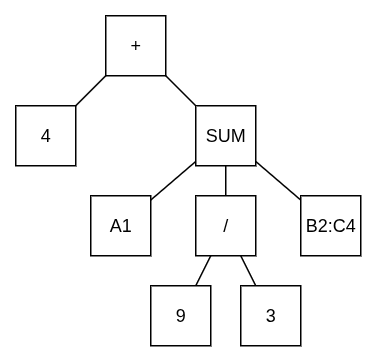
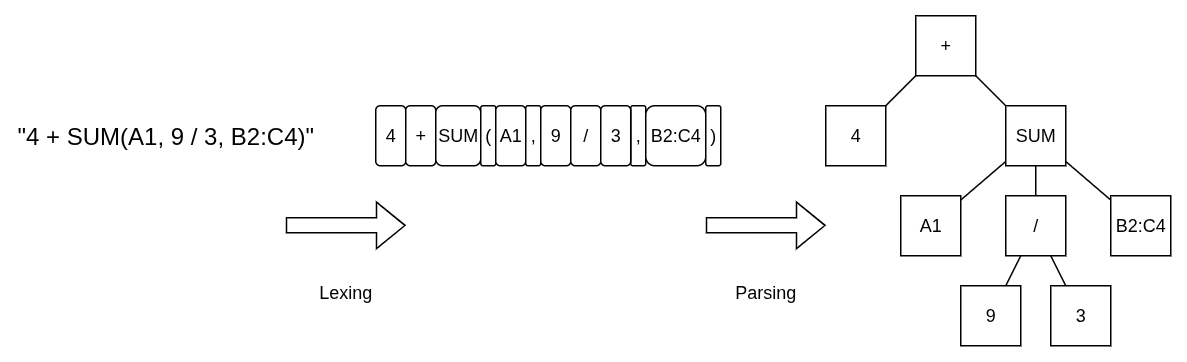
expression 4 + SUM(A1, 9 / 3, B2:C4) would have the following representation:
One operation that is common amongst all expressions is the ability to be evaluated.
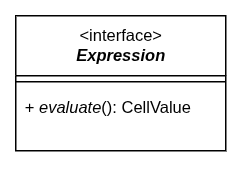
Whenever you have shared functionality, you should create an interface. Thus, our
top-level Expression interface is born:
Every node in the tree implements this interface, and there are two flavors of node:
- Terminal nodes are the leaves, a bare constant like
3, or (later) a reference to another cell. They can be evaluated, but they have no operands, soaddOperand()andgetOperands()just throwUnsupportedOperationException. - Composite nodes are the operators, like
+,SUM, etc.. They hold a list of child expressions and evaluate by combining the results of evaluating their children.
This split is the composite pattern, and it’s what lets a SUM node not care
whether its argument is a constant, a cell reference, or another nested SUM.
The Terminal class handles the leaves. For the operators, an abstract Operation class
holds the list of children and implements addOperand() / getOperands() a single time
so that no concrete operator has to.
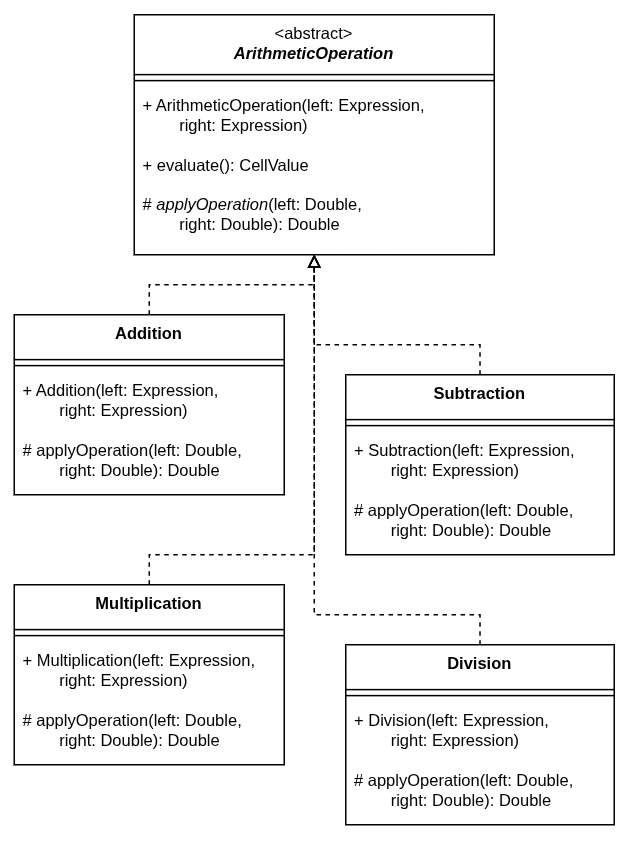
Arithmetic operators (+, -, *, /) always take exactly two operands and always
work on numbers, so they get their own abstract layer in the middle:
ArithmeticOperation. It implements evaluate() once: evaluate the left child,
evaluate the right child, unbox both CellValues to doubles, and hand them off to a
single abstract method:
protected abstract Double applyOperation(Double left, Double right);
That method is the only thing a concrete operator needs to implement. Here is
Addition in its entirety:
protected Double applyOperation(Double left, Double right) {
    return left + right;
}
Adding a new arithmetic operator is one short method in one new class, with no changes to any existing code. That “open for extension, closed for modification” property was an explicit requirement of the assignment, and the abstract-middle-layer approach is what makes it fall out naturally.
Referencing other cells
The whole point of a spreadsheet is that cells can refer to each other. You can reference
a single cell (=A1 + 5) or a rectangular range of cells (=SUM(A1:C3)). I wanted to
add this without disturbing the expression tree I had already built.
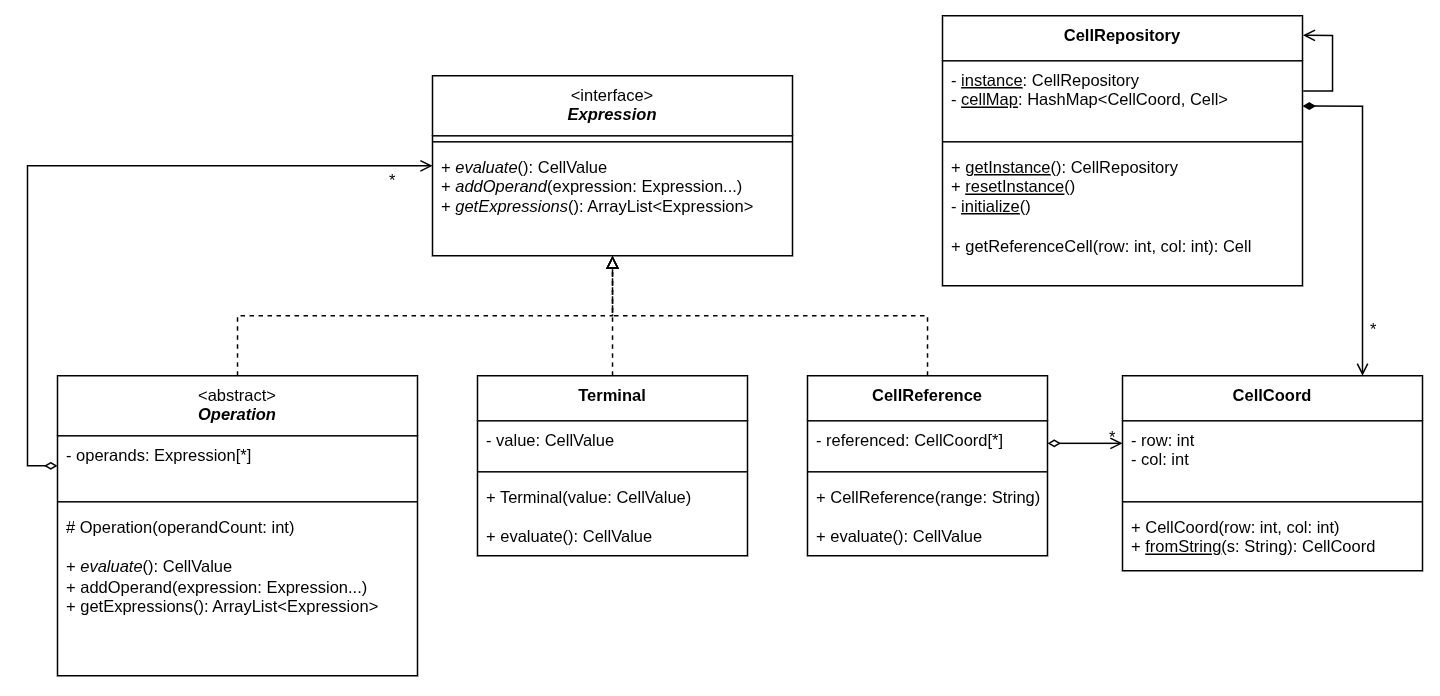
A cell reference is really just another kind of leaf: it can be evaluated (look up the
current value), and it has no operands. So it became a new terminal-style node,
CellReference. Internally it stores the coordinates of the cell or cells it points at.
When you evaluate it, it asks the CellRepository (a singleton that holds the entire
grid) for the current value of each of those cells. A single-cell reference returns that
value directly; a range returns a CellValue that wraps a list of values.
The rubric suggested unifying single cells and cell groups with a CellComponent
composite at the cell level. I went the other way and unified them at the expression
level instead, for a couple of reasons:
- Nesting a group inside a group (e.g.,
B5:(D6:F12)) is meaningless, so the recursive structure the composite pattern gives you would never be used. - A cell group only ever exists inside an expression. It never sits in the grid in place
of a real
Cell.
So "B5" and "B5:D12" both parse into a single CellReference node, and everything
downstream treats them the same way.
Aggregate operators - SUM, COUNT, COUNTA, AVE (and later MIN, MAX,
MEDIAN) - mirror the arithmetic setup exactly. An abstract AggregateOperation
handles the boilerplate and defines one method for subclasses:
protected abstract CellValue applyOperation(List<CellValue> operandValues);
The useful trick here is that AggregateOperation.evaluate() pre-evaluates every operand
and flattens any ranges before calling applyOperation(). So SUM(A1:C3) reaches the
Sum class as nine individual values — concrete aggregates never have to think
about ranges at all.
Cascading cell updates
If A1 holds =B1 * 2, then editing B1 has to update A1. And if C1 holds
=A1 + 1, then that has to update too, and so on down the chain. This is a textbook use
of the observer pattern.
There are two interfaces, CellSubject and CellObserver, and a cell is both: it is
watched by the cells whose formulas mention it, and it watches the cells that its own
formula mentions. Cell implements both interfaces and keeps a list of the observer
cells that depend on it.
When a cell changes, it calls notifyObservers(), which calls update() on each
dependent cell. update() re-evaluates that cell’s expression, stores the new value, and
then calls notifyObservers() itself. That last recursive call is what lets an update
cascade down an arbitrarily long dependency chain.
@Override
public void update() {
    if (expression != null) {
        this.value = expression.evaluate();
        notifyObservers();
    }
}
A cell does not manage its own dependency wiring, though. When you type a new formula
into a cell, something has to work out which cells it now depends on (and which it no
longer does) and fix up all the observer lists. I put that logic in a command object,
CellUpdateRequest, which also has the nice side effect of keeping the
SpreadsheetController from needing to know anything about cells or expressions.
CellUpdateRequest takes a cell coordinate and either a new value or a new expression.
When it executes an expression update it:
- walks the old expression tree looking for
CellReferencenodes, and removes this cell from each referenced cell’s observer list, - walks the new expression tree the same way, and adds this cell to each referenced cell’s observer list,
- sets the new expression on the cell and calls
notifyObservers().
Rebuilding the parser (independent study)
Everything from here down was extra (i.e., not part of the assignment). I did independent study to rebuild the expression parser from scratch.
The starter code’s parser worked fine, but it was a single class hard-wired to one algorithm (the shunting yard algorithm). I wanted two things out of a rewrite:
- swapping in a completely different parsing strategy should be easy,
- adding a new operator or token type shouldn’t mean editing the parser.
Two stages
Turning a string into an Expression happens in two stages: lexing (string to a
stream of tokens) and parsing (tokens to an expression tree).
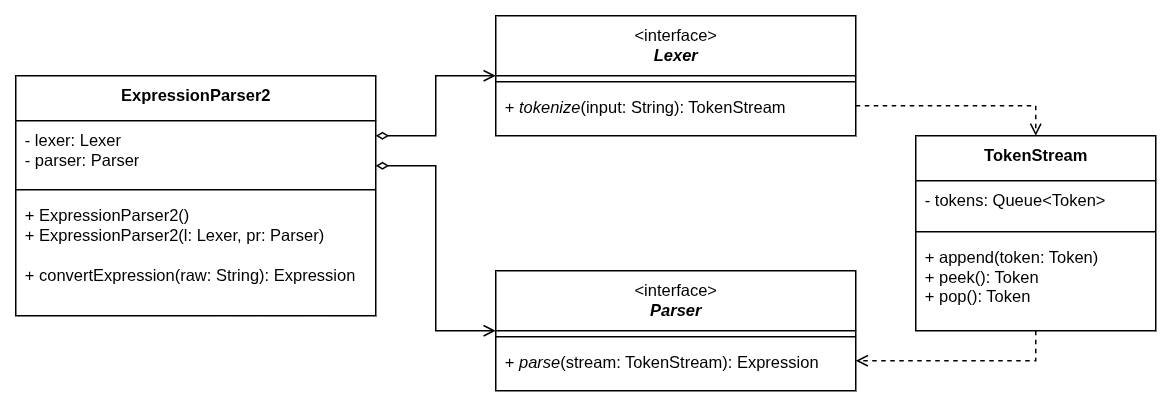
Each stage is an interface, Lexer and Parser, and the top-level
ExpressionParser2 just holds one of each and knows nothing about how either one works.
Tokens
A token is one atom of an expression: +, SUM, 3.14, ). Different kinds of token
behave differently during parsing, so they share a small Token interface
(getLexeme() and getLiteral()) and each kind is its own class: NumberToken,
CellReferenceToken, OperatorToken, IdentifierToken, SeparatorToken,
OpenParenthesisToken, CloseParenthesisToken, and BooleanToken. A new kind of token
is just a new class.
The lexer
I wrote a maximal munch lexer: feed the
input one character at a time, and emit a token as soon as the longest valid sequence of
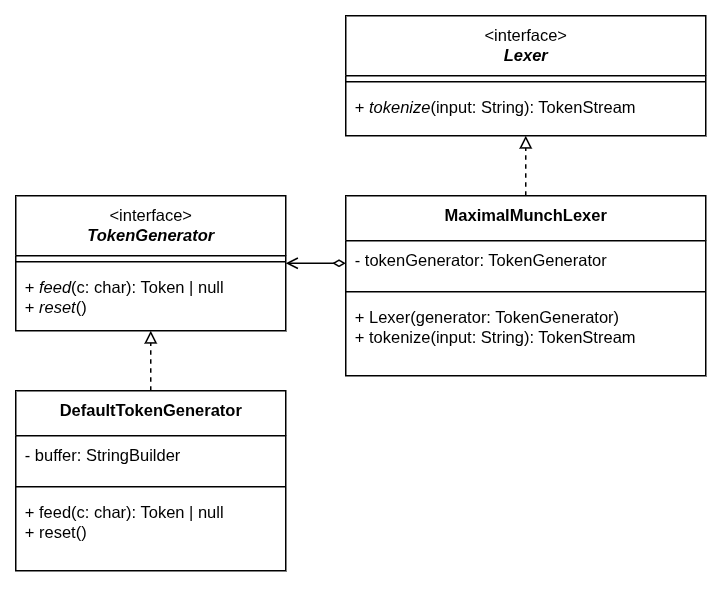
characters has been seen. MaximalMunchLexer pushes characters into a TokenGenerator
and collects whatever tokens come back out.
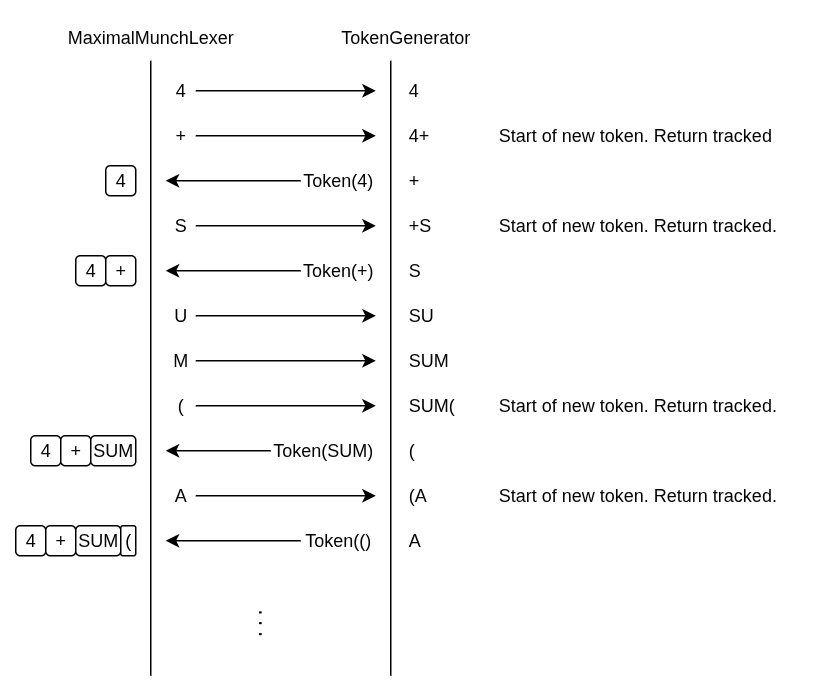
TokenGenerator is an interface, so supporting new token types means changing only the
generator implementation, never the lexer itself.
The parser
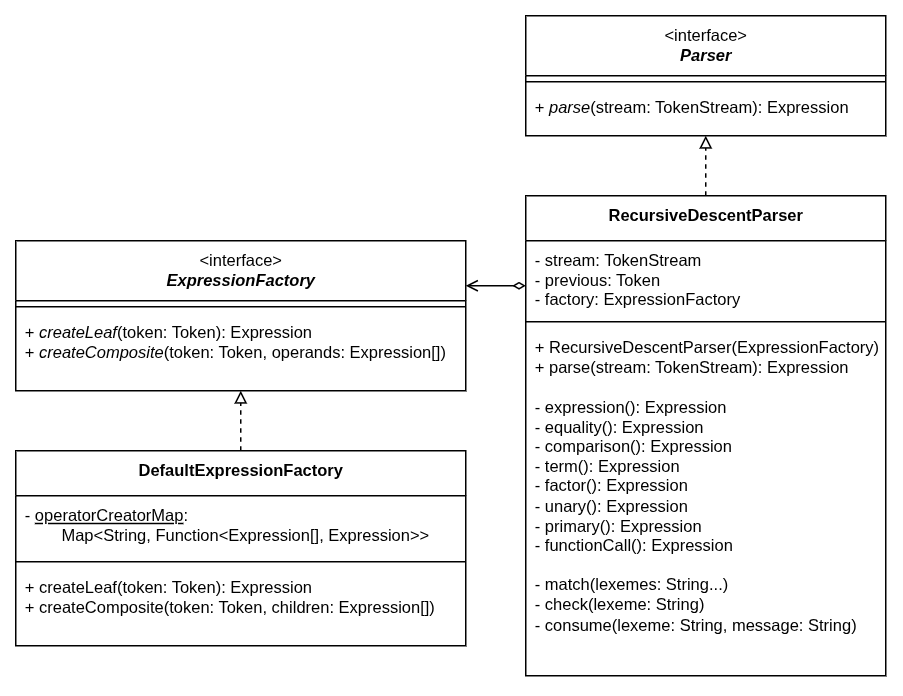
I wrote two implementations of Parser:
ShuntingYardParser: essentially a re-creation of the starter code’s algorithm behind the new interface.RecursiveDescentParser: a proper recursive descent parser built from a grammar, heavily inspired by Crafting Interpreters.
The recursive descent parser starts from an unambiguous grammar written in BNF, where each rule corresponds to a precedence level (rules lower in the list bind tighter):
expression   -> logical ;
logical      -> equality ( ( "&&" | "||" ) equality )* ;
equality     -> comparison ( ( "!=" | "==" ) comparison )* ;
comparison   -> term ( ( ">" | ">=" | "<" | "<=" ) term )* ;
term         -> factor ( ( "-" | "+" ) factor )* ;
factor       -> unary ( ( "/" | "*" ) unary )* ;
unary        -> ( "++" | "--" | "!" ) unary | primary ;
primary      -> NUMBER | "TRUE" | "FALSE"
              | STRING NUMBER ( ":" STRING NUMBER )?      // cell reference
              | "(" expression ")"
              | functionCall ;
functionCall -> STRING "(" expression ( "," expression )* ")" ;
Each rule becomes a method, each ( ... )* becomes a loop, and each | becomes an
if. The code ends up reading almost exactly like the grammar.
For the actual construction of Expression nodes, the parser never calls new. It calls
an ExpressionFactory (createLeaf, createComposite), which decouples it from the
entire Expression hierarchy. DefaultExpressionFactory maps operator lexemes to
constructor lambdas in a HashMap (the registry pattern):
operatorCreatorMap.put("+",   ops -> new Addition(ops[0], ops[1]));
operatorCreatorMap.put("SUM", ops -> new Sum(ops));
Registering a new operator is one line here, and the parser doesn’t change.
Operators that weren’t asked for
Once the parser was rebuilt, adding operators was cheap, so I added the following:
- Logical operators:
&&,||,!,==,!=,<,>,<=,>=, all returning booleans. - Unary operators:
NEG,ABS,++,--. - Aggregate operators:
MIN,MAX,MEDIAN - Conditional aggregates:
SUMIFandCOUNTIF.
The conditional aggregates needed one genuinely new idea. Their first argument is a
half-written comparison like 1 ==, an “incomplete operation”. Evaluating
COUNTIF(1 ==, A1:A5, B2) expands the range, completes 1 == against each value
(1 == A1, 1 == A2, …), keeps the ones that come out true, and runs the aggregate
over what’s left. An IncompleteOperation has a complete(Expression...) method that
returns the finished operator, and there’s an incomplete twin for each comparison
(IncompleteEqualTo becomes EqualTo, and so on).